Join via Cloudflare Tunnel
1. Create a Text document on your Desktop named Joinserver.txt or Joinserver
2. Enable Your File Name Extensons!
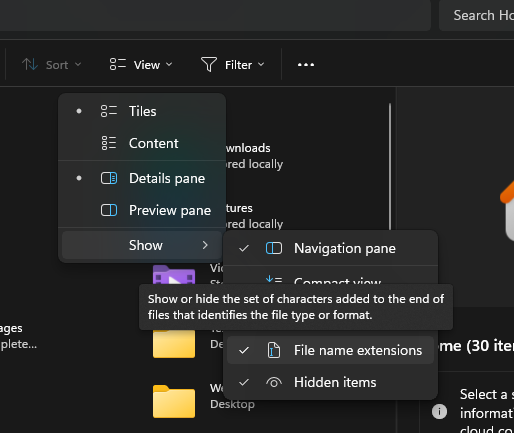
3. Rename your JoinServer.txt to JoinServer.bat AND make sure to remove the .txt to .bat
4. Run it and keep it runnning while your playing in the server
IF YOU HAVE ANY PROBLEM DM HOST
@echo off
title Pearl-Ore All-in-One Bridge
setlocal enabledelayedexpansion

:: 1. Check if cloudflared is installed
echo [SYSTEM] Checking for Cloudflare tunnel software...
where cloudflared >nul 2>nul
if %errorlevel% neq 0 (
    echo [!] Cloudflared not found. Starting installation...

    :: 2. Attempt installation via winget
    winget install Cloudflare.cloudflared --accept-source-agreements --accept-package-agreements

    if !errorlevel! neq 0 (
        echo [ERROR] Installation failed. Please run this script as Administrator.
        pause
        exit
    )

    echo [SUCCESS] Installation complete!
    echo [SYSTEM] Please restart this script to refresh your system path.
    pause
    exit
)

:: 3. Run the bridge if software exists
echo [SUCCESS] Cloudflared detected.
echo [SYSTEM] Connecting to Pearl-Ore Network...
echo [INFO] Keep this window open while playing!
echo --------------------------------------------------
cloudflared access tcp --hostname mc.pearl-ore.online --url localhost:44455

pauselocalhost:44455